
If you've visited Japanese sites, you're probably used to the text looking something like this:
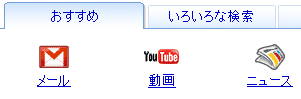
The font used here is called MS PGothic. It's quite an old font, and it actually uses bitmaps for smaller sizes like that one. This means there's no anti-aliasing at all, including ClearType. So Japanese text ends up looking a lot less nice than western text, especially if you've got ClearType enabled (which you probably do; it's on by default in Vista).
Windows Vista includes a brand new, much better, Japanese font, called Meiryo, which is optimized for screen reading and is fully ClearType enabled. Unfortunately, MS PGothic is still the default Japanese font in both Internet Explorer and Firefox.
Fortunately, we can change that by doing the following:
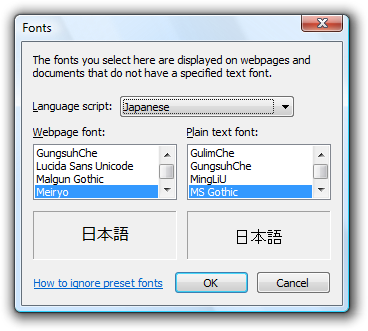
You must do this for both Japanese and Chinese, otherwise not all characters will be displayed with the new font. Now your fonts should look something like this:
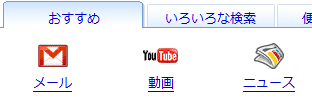
You can achieve the same effect in Firefox. The following instructions apply to Firefox 3:
Of course this only applies to sites that don't specify a font. If a webpage specifies in the HTML or CSS that it wants t use PGothic or another Japanese font, it will use that instead of your selection. In Firefox you can choose to have your choice override whatever font the page specifies; in IE, you cannot.
2008-10-29 10:30 UTC
how to set the Japanese font.
2008-11-22 16:38 UTC
thanks for the tip. unfortunately, it still looks like ass compared to mac osx.
2008-12-15 20:47 UTC
Thanks for the tip the text looks much better now and works very nice in my firfox.
2009-02-04 12:40 UTC
Thanks so much! Works like a charm :)
2009-09-30 17:18 UTC
This tip also applies to ugly japanese fonts on Windows 7.
2009-12-31 10:12 UTC
Any ideas how to put Japanese on
windows mobile 6.5?
2012-11-07 01:55 UTC
And if you want to specify this font in your web page, you can put this code in your CSS (It will fallback to MS PGothic if Meiryo is not available):
html {
font-family: Meiryo, MS PGothic, Arial, sans-serif;
}
Comments are closed for this post. Sorry.
 Subscribe