VATSIM Monitor is a desktop gadget for Windows Vista and Windows 7 that allows you to see who's online
on the VATSIM Virtual Air Traffic Simulation network.
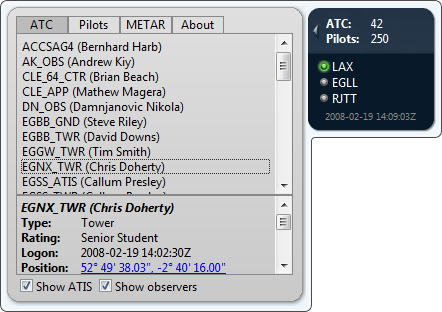
Features
- Quickly see how many people are online.
- Monitor any number of callsigns. VATSIM Monitor will show a green light when anyone is online with a callsign
starting with the specified string. You can configure any number of callsigns to watch, and you can choose
whether to include ATC, ATC observers and pilots when monitoring. A list of the people online starting with
that callsign is shown when you hover the mouse over the callsign.
- A list of all ATC and pilots currently online is shown in the flyout. Click any ATC or pilot to show details
such as ATIS message or flight plan. A link to Google Maps shows the position of that client.
- Use the flyout to quickly get METAR (aviation routine weather report) information for any airport.
Installation instructions
Click on the download link and choose "Open". Alternatively, save the file to your hard drive
and then run it.
When updating from older versions of VATSIM Monitor, it is recommended that you first remove the old
version by opening the gadget picker (right click the sidebar and choose "Add Gadgets..."), then
right click the VATSIM Monitor gadget and choose "uninstall".
Change Log
Version 1.1
- Fixed: data did not load after VATSIM's data server change.
- Fixed: an invalid client caused the entire data download to fail.
Version 1.0.1
- Fixed: rankings for ATC were incorrect
Version 1.0
