Find As You Type is an add-on for Internet Explorer 6 and 7
that provides a search bar that automatically searches the current page as you
are typing, without needing to click "Find" or press enter. This functionality
is sometimes known as "interactive search", "incremental search" or "look ahead search".
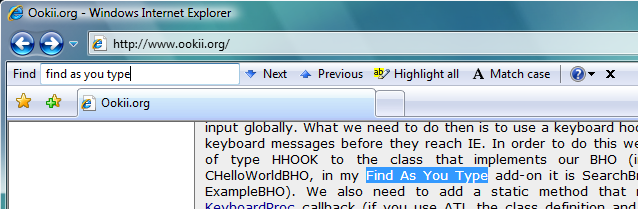
Support for Internet Explorer 8 and newer
As of Internet Explorer 8, search functionality similar to Find As You Type has
been integrated into the browser, so you no longer need to use an add-on. For this
reason, I have discontinued development of Find As You Type and do not officially
support it on these newer browser versions. While it is expected to mostly work
(except for handling the CTRL-F shortcut key when the keyboard focus is outside of a browser tab),
I recommend using the built-in functionality instead.
Find As You Type is still provided for those users who cannot upgrade to a newer
version of Internet Explorer.
Installation instructions
If you have version 1.0 of Find As You Type installed, you are advised to
uninstall version 1.0 before installing version 1.3. For other versions, you
can upgrade without uninstalling first.
Spyware/adware-free guarantee
Find As You Type for Internet Explorer is not spyware, adware,
or any other form of malware. It does not install any hidden components, and can
be completely removed at any time using the "Add and Remove Programs" option from
Control Panel. Find As You Type does not send any information about your browsing
habits or search usage to ookii.org or anyone else. Find As You Type does not show
any advertisements.
Find As You Type will periodically send version information to ookii.org to check for updates.
No information is included that can be used to identify you. Update checking is
optional and can be disabled from the settings dialog.
Of course you don't have to take my word for it. You can download the source code,
check it out, and compile it yourself if you like.
Version history
Version 1.3
- Note: Windows 2000 is no longer supported.
- German, Italian and Dutch localized versions available.
- Find As You Type can now search while you're typing using an Input Method
Editor (IME).
- Search bar closes when browser is closed to prevent automatic opening on
browser start.
- The behaviour that the ESC key clears the search text before closing the
search bar is now optional. The default is to immediately close the bar.
- Reliability improvements.
- Improved error handling.
- Fixed: search bar does not work in windows without a toolbar, and prevents
regular IE find window from opening if CTRL-F shortcut is used (in
version 1.3, the search bar still does not work in those windows, but the
regular find window will open correctly).
- Fixed: certain dialogs do not use visual styles.
- Fixed: a message is displayed repeatedly when update checking fails.
- Fixed: IE in protected mode does not share settings with IE outside protected mode.
- Fixed: Highlights are not updated if "highlight all" is selected and the user
toggles the "match case" button using the keyboard shortcut.
Version 1.2
- Text in the search field is selected when the user presses CTRL-F.
- Improved support for pages with frames and iframes.
- Support for highlighting all occurrences of a search term on a page.
- The shortcut key used to open Find As You Type can be configured by the user. The
default is still CTRL-F.
- The toolbar has a close button.
- Pressing the Escape key now clears the search box first, and closes only when the
box is empty.
- If the currently highlighted search result is a hyperlink, you can follow this link
by pressing alt-enter.
- The background color of the search box turns red when the search text is not found.
- FIXED: Shortcut key does not work in IE7 when UI elements outside a tab (such as
the address bar) have focus.
- Support for automatically opening the the Find As you Type toolbar when you begin
typing on a web page. This is not enabled by default; you can enable it using the
settings dialog.
- Support for opening the Find As You Type toolbar when you press the forward slash key. This
is not enabled by default; you can enable it using the settings dialog.
- Support for automatic update checking.
- A chevron is displayed when not all the toolbar buttons fit in the window.
Version 1.1
- SearchBar opens and gets focus when the user presses CTRL-F in the browser.
- SearchBar closes when the user presses ESC while the searchbar has focus.
- Pressing Enter in the search box triggers "Next".
- Similarly, shift-Enter triggers "Previous".
- The search highlight is cleared when all text is removed from the search box.
- The "search passed the end of the page" message is cleared from the status bar if
you search again.
- Fixed some tab-key navigation issues.
- Fixed the match case button text being cut off on Windows 2000.
- Font size and DPI support improvements.
Version 1.0
